
SceneFlare

Pet Seal Filter

Turn your dog or cat into a chubby seal with its own face and coat colors. Upload one pet photo for an 8-second vertical reveal with sound.

Your photo
Pet photo

Upload one pet with its face and body visible. Leave space around it for the wider seal shape.

Pet Seal Filter

Still your pet. Suddenly a seal.

A familiar face stays put while the body becomes a round, lounging seal. Pet Seal Filter gets its surprise from that simple before-and-after: a brief ordinary pose, a sweeping scan line, then flippers where paws used to be. Dogs and cats can both take the seat.

8s · 9:16Seedance 2.0 Mini · 720p

The familiar face is what makes the seal reveal funny

Frames from the reference clip

Keep the face you know

The seal body is new; your pet’s expression, ears, coat color and markings are what connect it to the original photo. A clear front or three-quarter view makes those features easier to read. Include the body and its chair, sofa or floor rather than uploading only a tiny face crop. The background in your photo provides the starting setting, so an ordinary resting spot is a useful choice. One animal per image keeps the subject unambiguous; this is a single-pet transformation, not a two-pet scene.
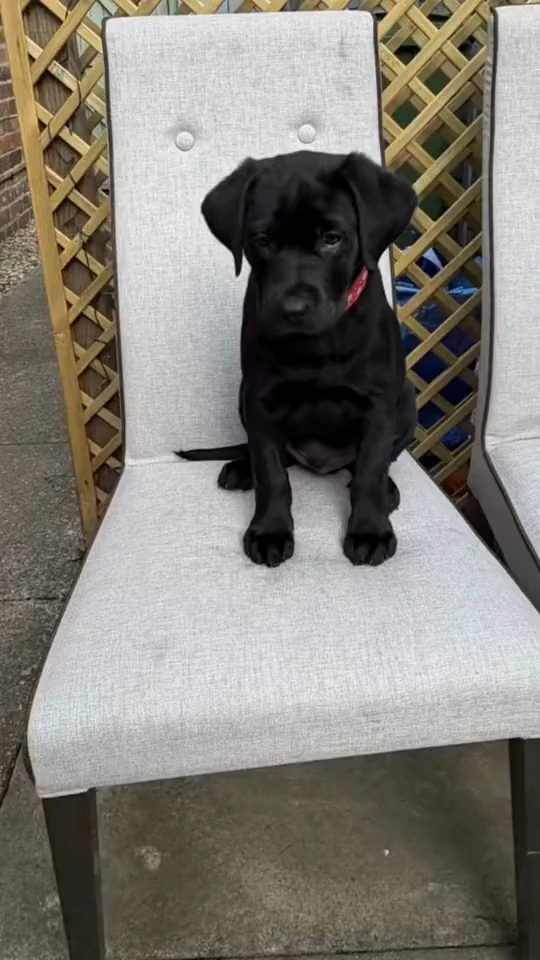
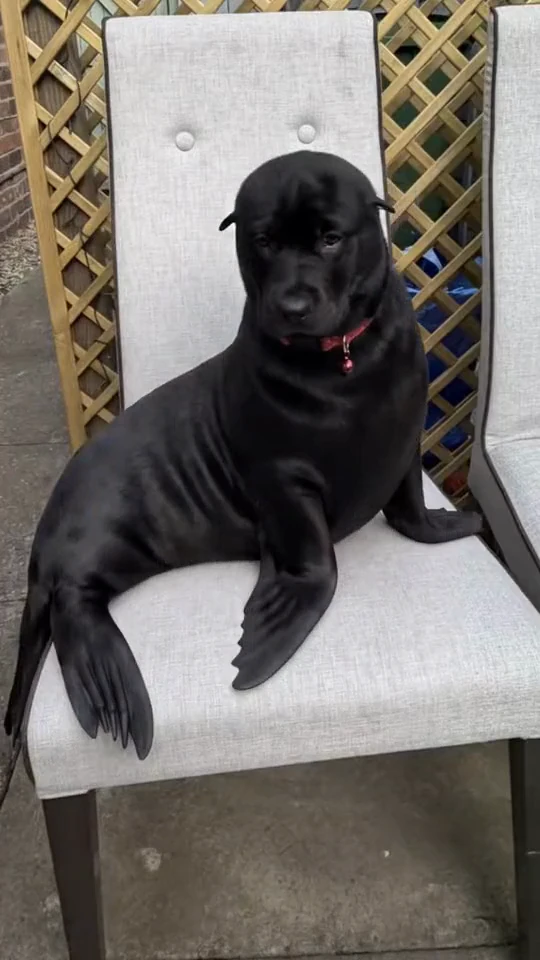
Keep the face you know

One pass, from left to right

The reference reveal uses one upright boundary moving from the left of the animal to the right. The region it has passed is already the final seal shape; the rest still looks like the original pet. Once the pass finishes, the new body stays visible. There should be no second top-to-bottom scan or reversing wipe. Leave space around the animal for the wider body, and check that its own face, fur color and markings remain after the change. A golden dog should not turn into the black dog from the reference.

One pass, from left to right

How to make your video

01

Choose one pet photo

Keep the eyes, ears, coat markings and body visible, with room around the animal.

02

Select settings and optional notes

Choose a compatible model and resolution. The scan and transformation are already described.

03

Generate and watch the whole reveal

Sign in, check the credit estimate and generate. Review the starting pet, change and final flippers before downloading.

Questions before you create

Can I use a cat as well as a dog?

Yes. The photo supplies the pet’s face and coat markings. Start with one clearly visible animal; this page accepts one pet photo and does not assign two pets.

Will my pet stay in the same room?

The instructions prioritize the background and supporting surface in your photo. They may be reinterpreted as the body changes; a plain setting with enough space gives the model clearer guidance.

Is it a photo or a video?

It is an 8-second, 9:16 video: the pet appears normally first, the scan reveals the seal body, and the final shape stays visible. It is not an interactive camera filter.

Which model and resolution can I choose?

Seedance 2.0 Mini at 720p is the default. The selector offers compatible models for the fixed 8-second duration. Resolution choices and the credit estimate update with the model; reference processing is included.

Does the video have sound?

Yes. We add the audio from the matching 8-second reference excerpt after generating the visuals. The background reference video guides the reveal; your photo supplies the pet.

Are these pictures actual results?

The player and section stills come from the same pet-to-seal reference clip. They show its before-and-after reveal, not your generated result. Your uploaded photo supplies your pet.

Pet Seal Filter

One pet photo. A sweeping line. A very round surprise.